Posted on Leave a comment

DIY Charging Station: Organize Your Countertop Space

We had too many devices to charge and too little space on our counter to put them. We did have a nice little charging station that we bought on Amazon, so all I really had to do was build a few shelves and set the charging station on top, making sure there were gaps in the shelves to allow cords down through. Including the charging station, this would have only cost about $45 if I’d had to buy supplies – which I didn’t because I had enough scrap! That’s always a win.


Supplies:

(As an advertising affiliate and Amazon Associate, I earn a small commission from qualifying purchases. But it doesn’t cost you anything extra and helps me keep up my site!)

  • Charging station
  • 1x2s (I used about 12 feet total of nice poplar)
  • brad nails (or little nails and wood glue)
  • sandpaper
  • wood putty
  • paint or stain
  • a small hook (optional)

Tools:

  • Saw
  • Nail gun (or use tiny nails and wood glue)
  • paint brush
  • sander (or just sandpaper)
BEFORE: Scrap 1×2 wood.

Step 1: Measure and plan. I had about 8 inches to work with as far as height because I wanted to set our Google Nest Hub on the top without being hidden under our cabinet. And since iPads and phones and our Nintendo Switch and things are fairly thin, I didn’t need to make the spacing between shelves very high at all. I decided to make the bottom space between the counter and the underside of the bottom shelf 4 inches tall, leaving plenty of room for my daughter’s headphones to sit while charging. The space between the bottom shelf and top shelf would be about 1.75 inches because I’d use pieces of 1x2s lying on their sides as supports, and these are realistically about 1.75 inches wide. Including the width of the shelves themselves (again 1x2s), this would bring my whole height to about 8 inches.

As for how long my shelves would be, I went with 24 inches for the whole setup. This gave a little bit of room on one side of our counterspace so we could still set miscellaneous junk there behind a little fake plant. 😆 This also gave plenty of room for the charging station to sit on the top shelf beside our Google Hub, plus leaving a little extra room on that top shelf for whatever.

For width, I didn’t want it to stick out too far, and since an iPad is the widest thing that needs to sit here, I went with 6 inches wide for the bottom shelf. The top shelf would be closer to 5 inches because I already had a shelf premade that was about 5 inches.

Also, I didn’t plan for this at first, but I ended up offsetting the shelves a little bit so that the top shelf overhung the bottom shelf to the left and the bottom shelf stuck out farther to the right. This gave me a place to add a little hook on the left for coiled cords I want to keep handy (the headphone cord), and it made a little side shelf on the right for our anti-bark dog zapper (a must in our home).

Step 2: Cut the wood. As I said, I already had a premade shelf for the top shelf – I used a scrap section of our old outdoor table, which really has been the wooden gift that keeps on giving, as I’ve gotten several projects out of that one table! 👍 But, you can easily just use 1x2s to make this top shelf the same way as I made the bottom shelf, just with one less 1×2 for less width.

I played around with my 1x2s and arranged them according to my plan to make sure this looked how I wanted, and once satisfied I started cutting.

Trying out my plan (ignore the 2x2s 😆)

First, I cut the 4 legs for the base of my shelving unit. These 1x2s I cut to my planned 4 inches. Done.

Cut legs.

Then I cut 2 pieces to 6 inches long to use as supports for the bottom shelf, and the legs would connect to these as well.

Next I cut 2 pieces to 5 inches long to use as supports for the top shelf, setting these on the bottom shelf.

For the longer 1x2s for the shelves themselves, I cut 3 pieces to 24 inches long for the bottom shelf. Since you’ll need to do a top shelf too, you’d just need to cut 2 more for that shelf.

With my pieces all cut, I sanded down the rough bits and also smoothed down the corners.

Step 3: Assemble the pieces. One of the smarter things I did was to get my T-square to make sure everything was right. Holding the 4-inch leg pieces so they were square with the 6-inch support sitting across the top of the legs, I used 2 brad nails in each leg to attach them to the support. I repeated this for the second set of legs and their support.

Attaching legs to a 6-inch support.

Next, I positioned the 5-inch supports where I wanted them under my top, 5-inch-wide shelf. For you and your two 1x2s for the top shelf, lay them across the 5-inch supports so they’re flush with each end of the support, and this will leave a nice gap in the middle for cords to go down through. (You’ll actually have a bit more room than my shelf gave me, which would be nice.) It looks nice for the supports to come in a little bit at each side, so I brought the supports in 1.5 inches from each end of the 1x2s. Again lining things up with my T-square, I nailed the top shelf on along the 1×2 supports that sat on their sides under the shelf.

Attaching top to 5-inch supports.

Flipping this over, I attached the bottom shelf’s 1x2s to these same supports. This was when I decided I wanted to offset the top and bottoms shelves, so I put one end of the bottom shelf’s 1x2s exactly flush with the top shelf’s support, and the other ends stuck out a bit farther. (If you don’t want to offset, just position them again 1.5 inches from either end.) First I nailed on what would be the back 1×2 of this bottom shelf, and I made sure it lined up exactly with the back of the support so that the top and bottom shelves would be flush. (See the picture if this doesn’t make sense.) I used 2 brad nails for each end of that first 1×2…and missed a little bit with one, but it’s fine – LOL. For the next, middle 1×2 of the bottom shelf, I used a spare 1×2 as a spacer between them. I wanted this space so cords could also go through this bottom shelf, much like the top shelf. I nailed that middle 1×2 on, then moved my spacer for the front 1×2. Here, however, this 1×2 stuck out a bit farther than my 5-inch support because this bottom shelf would be 6-inches wide (between the 1x2s and the spaces, this shelf’s width comes to 6 inches). So, for this front piece, I only used 1 nail to hold it in place, then removed the spacer.

Adding and spacing the bottom shelf’s 1x2s.

With the top and bottom shelves connected, it was time for the legs and bottom supports. I moved the shelves and stood up the legs and their attached 6-inch supports along my T-square, and I made sure the legs were on the outside with the supports on the inside. Then I set my assembled shelves on top of these legs/supports, making sure the supports between the shelves lined up exactly over the bottom legs. This makes straight lines that seem to run from the bottom to the top of the whole unit. (If you haven’t offset your shelves, the ends of your shelves will be even too.) Because the bottom shelf sticks farther forward than the top shelf, I was able to easily nail the bottom shelf’s front 1×2 onto the legs and supports. For the back, I just drove the nail at a bit of an angle so it went through the bottom shelf into the support. That was enough to hold the whole thing together on either end.

Nailing the shelves onto the legs and supports.

Step 4: Paint or stain. Staining these 1x2s would look pretty. But since my top shelf was what it was, I needed to paint the whole thing. I found the same paint I’d used on my kitchen cabinets, so that was a plus! I quickly found that a small brush worked best to get in all the narrow spaces. I also should have used nail putty to fill in my holes, but I forgot that until I was done. 🤦‍♀️ Oh, well. Do as I say, not as I forget to do.

Assembled but in need of paint.

Step 5: Add hooks (optional). Since I’d offset the shelves, I had a space under the left end of my top shelf to add a little hook for holding coiled cords. This isn’t necessary, but I can see where it will be handy for cords I don’t want to lose…or even car keys or something.

Added side hook.

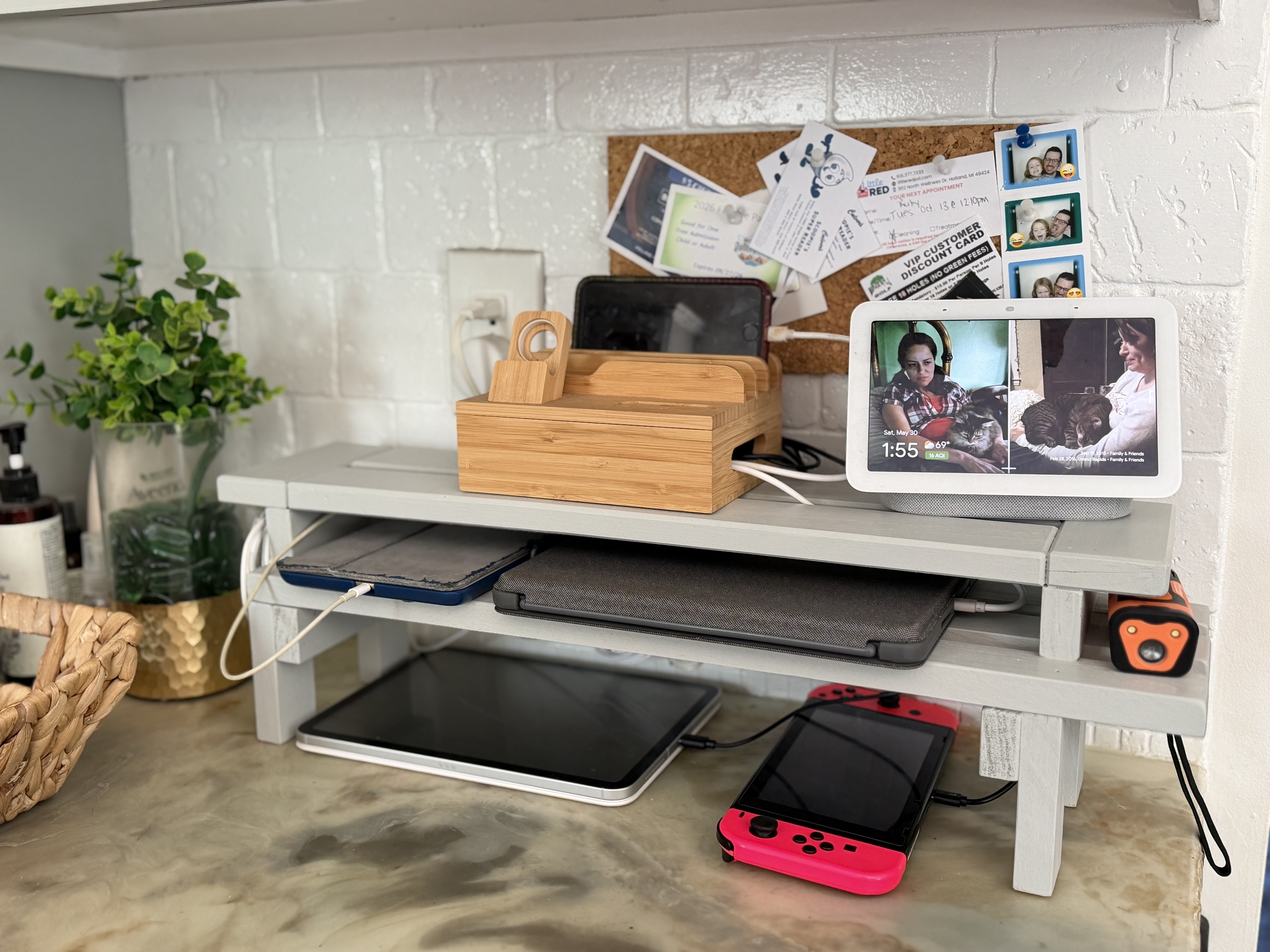
Step 6: Arrange charger and cords. Setting our existing charging station on the top shelf next to our Google Hub, I organized our different charging cords coming out of the thing and tucked a few down through the shelves’ gaps, depending on what we’d want to set where. Because the bottom shelf was wider, that’s where the cords for two of our iPads went. I hung the cords for the Switch and newest iPad down through both shelves so these could sit right on the counter, tucked under the shelves. The headphone charger went here too…though my daughter couldn’t find them for the picture, which isn’t worrying at all – LOL.

Really, you can arrange these cords however you want – that’s what’s great about making these things custom, right?

I love that this frees up counterspace and gives our devices an organized home. And it matches my cabinets, which looks extra nice!

AFTER: Charging station shelves!


DIY Must-Have Lists

Click to see more!
Click to see more!
Click to see more!
Posted on Leave a comment

Hanging Plant Basket Makeover

Indoor plants don’t do well in my care, but I like the pop of green that a hanging fake plant adds to my bathroom…I just didn’t like staring up at the black plastic basket hanging over my tub. This week, I finally got around to giving the basket a makeover, and it looks way better now.

This little project was basically macrame for a lazy person who didn’t want to actually follow a pattern, and since I didn’t want to see the basket/pot at all, my full wrap job did the trick without actually needing to know what I was doing. Plus, if you’ve already got a hanging basket and hot glue gun, this only costs like $5 for the string.


Supplies:

(As an advertising affiliate and Amazon Associate, I earn a small commission from qualifying purchases. But it doesn’t cost you anything extra and helps me keep up my site!)

Tools:

BEFORE: Supplies.

Step 1: Prep the basket. As an optional part of your prep, you might want to paint your basket if it’s a dark color and you don’t want to see any of it through the wrapped string. I thought of this after I was done wrapping the basket, and I do like the contrast of seeing the black through the white string to give it a little dimension and depth. But if you want it to look more like a solid wrap job, paint the basket first so your base is the same color as the string.

Before you start, you’ll want to remove the connected fasteners and hook part that hangs the basket. I think most hanging baskets usually have 3 of these ends that go up to the hook, and I cut off the fasteners to use for my new part that would hang the basket. More on those in a minute.

Save these.

Step 2: Wrap the whole basket. With my string ready, I added a spot of hot glue to the very center of the basket’s underside, and I stuck the end of the string there. Then, going around and around from this center, I added dabs of glue to hold the string tightly in place as I circled around the bottom to cover it.

NOT cutting the string, I moved up the basket from the bottom/underside and continued to wrap the string around and around the basket’s sides. I added more glue then I’d planned, so this took a bit of time, but I wanted the string to stay as tight as possible to hide the black basket decently. This was a lot of going around and around. When I reached the top of the basket’s main section, I cut the string and glued the end down tight.

Starting to wrap from the bottom.

If it doesn’t look covered to your satisfaction, you could always go around a second or even third time, if you have enough string. I was satisfied with one layer. You also could make one long braid and wrap that around and around, but that seemed like more braiding than I wanted to do – but it would look nice.

Step 3: Braid 3 equally long braids for hanging the basket. These will be used to hang the basket from the 3 fasteners, and they run down the sides to tie under the basket and make it look like they hold the basket too. I measured…sort of…by stretching my arms wide and cutting each strand of string to that length. You’ll need 9 equal strands, 3 for each of the 3 braids.

After tying 3 strands together at one end, I braided them together and then tied the other end. I did this to make 3 braids of the same size.

Making hanging braids.

Step 4: Wrap and connect the fasteners for the hanging braids, then tie the braids. Using my string again, I tied on an end to a fastener and wrapped it around until all the plastic was pretty well covered, then tied it off again and added a spot of glue to help. I did this for all 3 fasteners.

Then I took my finished braids and found the middle of each, and that was where I stuck on my fastener before snapping the fastener back in place onto the basket. I then tied a knot over the top of the fastener where it stuck up a bit, just to cover the plastic end. Again, I did this for all 3.

Wrapped fasteners and finding middle of each hanger braid.

Once they were on, I took one end of each braid and tied these together, making sure they were equally long so the basket would hang straight.

For the other end of the braid (the other half that wasn’t tied above), I made sure all 3 strands hung evenly to the underside of the basket and then tied them together in a knot right at the center of the basket’s underside. Once this knot was tied and secure, I undid each braid’s tied end and unbraided them so the strings hung more like tassels from the bottom of the basket.

(Forgot to take a picture of the bottom until I was done)

That gives you the look of the basket hanging from a little braided holder.

Step 5: Add thicker braids along the top and bottom of the basket. Once the fasteners and braided hangers were on, I wanted a thicker braid around the top edge. This again took 9 arm-length strands of string, but this time I tied them all together and braided using groups of 3 strands for each section. This made a thicker braid and was actually easier on my fingers. 😆

Taking one tied end of this bigger braid, I glued it just over the inside of the basket, then glued it around the basket’s top to cover the edge AND cover the fasteners. I ended up doing 2 laps around the top to completely cover the top of the basket.

Top thick braid on.

For the bottom, I again cut 9 strands, but these only needed to be about half as long because the bottom of my basket was narrower and I didn’t need to do 2 laps around. Rather than securing a knotted end, I took the end of my thick braid and squeezed hot glue into the strands to secure them together. Then I ran it OVER the three hanger braids and glued it all the way around the bottom of the pot. When I got back to my starting point, I cut the end and again squeezed glue right into the braid’s end to hold it together without a knot, then glued it in place.

Step 6: Add decorative braids. With the base wrapped, hanger braids on, top braid on, bottom braid on – all that was left was adding some decorative braids around the pot. I did a few thick and a few thin, and I glued them all over in loops around the pot, making sure to run them under the 3 hanger braids where they ran down the sides. (I just thought that looked better.)

Glueing decorative braids on.

When my hands were sick of braiding, I was done! Putting my fake plant back in the basket, I hung it over my tub again, and it looks so much nicer now.

AFTER: New hanging plant basket.


DIY Must-Have Lists

Click to see more!
Click to see more!
Click to see more!
Posted on Leave a comment

DIY Shelf Stand for Awards

Thursdays are karate days, so today seemed perfect for tackling this project. I’d promised to build shelves for our home gym to display my daughter’s karate belts and awards, and I managed this without a trip to the hardware store – so it’s a win for me too!

A wheelbarrow filled with various pieces of lumber, including long wooden boards and cut pieces, set in a garage with a gray vehicle in the background.
BEFORE: Scrap wood.

Supplies:

(As an advertising affiliate and Amazon Associate, I earn a small commission from qualifying purchases. But it doesn’t cost you anything extra and helps me keep up my site!)

Tools:

  • Hammer
  • Paint brush
  • Tape measure
  • Saw

Step 1: Plan and cut wood. I had a lot of good scrap wood left from when I redid my other daughter’s bed, and these shelves took two 2x2s (mine were 6 ft long), twelve 11-inch 1x4s, and seven 16-inch 1x4s.

I wanted an overall narrow but tall shelf stand, so that’s why I went with 6-feet tall. And by setting my 1x4s across the two 2x2s, I decided I liked 11-inches for the crosspieces and 16 inches for the longer shelf pieces, and this let the shelves stick out 2.5 inches on each side. Pretty easy math that way, so I went with it.

I cut my 11-inch 1x4s first, then my seven 16-inch 1×4 pieces. I didn’t have to cut the 2x2s at all because mine were already 6 ft.

A person holding a piece of wood in front of a miter saw in a workshop.
Cutting 11-inch crosspieces.

Step 2: Attach crosspieces. I did all of this by lying my wood across the top of a yard cart, but you can use the floor or a table. The whole project was easy to do with the thing lying down, so don’t worry about standing anything up until the end.

First, I made VERY sure that my 2x2s were evenly spaced and square. You definitely want the bottoms even so it sits straight. Next, I nailed on one of the 11-inch pieces across the top, keeping the edges as flush as I could. With that top piece on, I did the same at the bottom. That kept the overall structure square while I nailed on the crosspieces in the middle. I spaced them semi-evenly, but I was a bit lazy with it – I just did my best to make sure 12 inches went from the top of one crosspiece, skipped the next, and hit 12 inches at the top of the next board.

A close-up view of a wooden ladder with three horizontal rungs, placed in a garage next to a car tire and various items.
Attaching crosspieces.
Wooden planks and a tape measure resting on a work surface, indicating measurement for a woodworking project.
Checking spacing for shelves.

Step 3: Attach long shelf pieces. Using wood glue, these stayed in place nicely. To make things easy, I measured 2.5 inches from each end and marked with a pencil to be sure they ended up in the right position. This seemed like a good idea to help me get them in place quickly once the drippy glue was on.

A close-up of a measuring tape showing dimensions alongside a wooden edge in a workshop environment.
Positioning shelf.

Then I ran a bit of glue along the top of the chosen crosspieces as well as dabs on the 2×2 where the shelf would connect. Then, I simply set the 16-inch 1×4 pieces on their sides on the 2x2s so the bottom back side stuck on the glue on the crosspiece, which was now “below” the self for a support.

I DID add a few nails at the very topmost board and the lowest board/base to help with stability. Nothing heavy is going on my shelves, so wood glue alone is fine for the middle shelves.

Side note: If you ARE going to put heavy things on your shelves (like statue awards, etc.), you should probably add a few nails into the top of each shelf where they sit on the crosspiece like a base support. To make this easier, you might want to nail them on BEFORE connecting the crosspieces to the 2x2s so your hammer or nail gun has room.

A partially assembled wooden project featuring brightly colored edges, a bottle of glue, and a hammer on a workbench.
Attaching shelves.

Step 4: Paint. After the glue dried, I sanded the exposed edges and sides smooth. Next, I painted the whole thing in a dark blue…because that’s what I had a lot of. 😆 I used 2 coats but didn’t bother with the backside because that’ll be against the wall. I did paint the insides and outside of the 2x2s because you can see through the spaces between the crosspieces.

Step 5: Secure with a furniture hook. Obviously this would be very tippy if left standing against a wall, so I added a furniture hook to the back wall and screwed a connecting line onto the back of the top crosspiece. This holds the whole shelf secure so it doesn’t fall over, but it’s not a heavy-duty install that would make it difficult to relocate if we want to move the stand later.

Step 6: Add hanging hooks. If you’re hanging medals on these shelves, these hooks are a great idea to add some dimension to the shelves. My daughter wanted her belts to hang up once rolled, so this worked for those too. I decided to screw my hooks in front of each 2×2, positioning them forward enough to spin around.

Close-up of a black wooden shelf with a metal hook attached.
Screwing in hooks.

Step 7: Add your awards! We’re apparently missing a paper for the orange belt, but otherwise I could put things in order and leave room for belts to come! I hung the belts with just a piece of string wrapped around them and then attached to each hook (I need a few more hooks, but folding a few belts adds variety, right? 😉) I also had a few boards she’d broken, so I added those too. And we framed the little awards she’d been given, so it’s all there for her to be proud of.

A black wooden wall shelf with several horizontal slats for storage, mounted on a white wall, alongside various fitness equipment including bike wheels, a stability ball, dumbbells, and a pump.
Ready!
A wall display featuring various awards and certificates, including a 'Rockstar Award,' 'Exceptional Attendance' certificate, and several framed accolades emphasizing qualities like Determination, Perseverance, Self-Discipline, Respect, and Integrity. Below the display, fitness equipment such as a stability ball, dumbbells, and bicycle wheels is visible.
AFTER: Awards shelf stand.


DIY Must-Have Lists

Click to see more!
Click to see more!
Click to see more!
Posted on Leave a comment

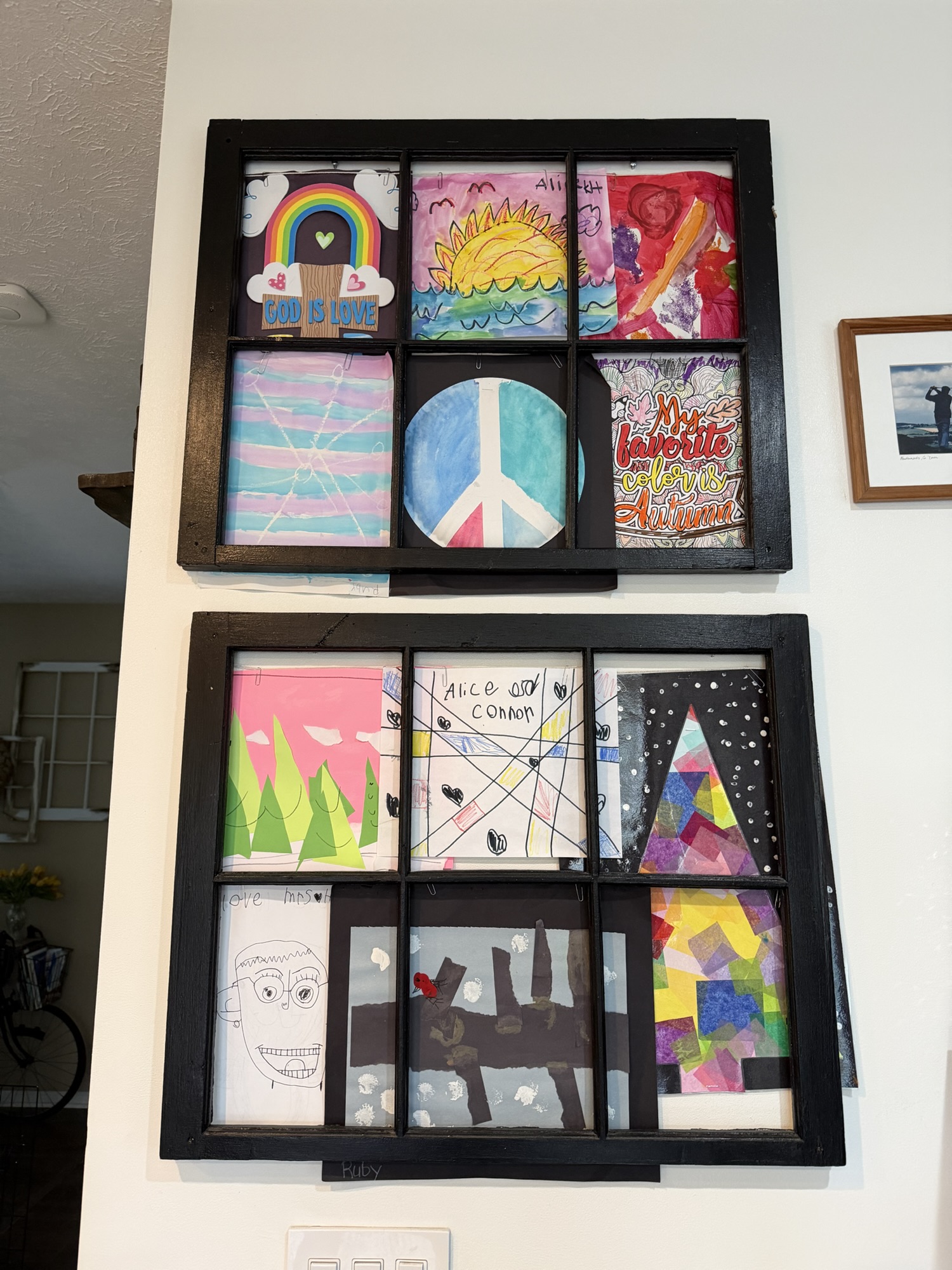
Window Frame Kids’ Art Display

We only have so much room on our fridge for the art my kids make me that we HAVE to keep. I wanted a slightly nicer way to display these masterpieces without just tacking them on a corkboard, and those cute little frames you can buy to display kids’ artwork would never be enough, plus you never know the size of paper that’s going to come my way.

But I did have 2 old window frames, so…


Supplies:

(As an advertising affiliate and Amazon Associate, I earn a small commission from qualifying purchases. But it doesn’t cost you anything extra and helps me keep up my site!)

  • Window frame (can use craft store window frame with chicken wire removed for smaller frames, or search Etsy for full-sized window frames)
  • String
  • Staples
  • Paperclips

Tools:

An old wooden window frame with six panes, a staple gun, a ball of twine, and a small container of colorful push pins, placed on a marbled surface.
BEFORE: Old window frames, string, and paperclips.

Step 1: Paint or stain the frame. Mine were already painted black, and I thought that would look nice for a distinct frame, so I left them black.

Side note: I know not everyone has spare window frames lying around, but you can buy the same size as mine on Etsy or smaller frames at a craft store – the kind that have chicken wire to clip things onto. If you’re like me and don’t really like the farmhouse-y, chicken wire look, you can snip off the chicken wire and go from there. Or, if you want to be really creative, you can make frames from 1x2s. For my project, I used old window frames all ready to go (like you’d find on Etsy).

Step 2: Cut string. Here’s the thing – I didn’t want to just stick the artwork on the front of the frames because that would hide the frames, and the artwork would flap around from open windows and fall off too easily. So, I wanted the artwork to sit behind the frames and be…well, framed by each section of the frames. This meant I’d need to attach the art papers to the backside of the windows. To do this, I needed something that wouldn’t stick out or keep the window from hanging flat against the wall.

Solution: string, paper clips, and staples, all lying flat against the back of the window so it wouldn’t make the frame stick out or fall off the wall.

Turning the window frames backside-up, I unspooled my string to stretch from one side of the window to the other and cut the string so a little extra would go on either end. I needed 2 strings at roughly the same length for each window.

Close-up of an old wooden window frame with a partially painted edge, resting on a surface. A yellow tool is visible next to the frame.
Cutting the right amount of string.

Step 3: Staple on the string. For the topmost string, I needed to bring it down about a half inch so the hanging screws in the wall would have a place to catch/hold the frame without getting caught on the artwork or string. Starting at one end, I looped the string a bit to add to how it would be held down, and then I stapled the string onto the window frame. Holding that tight all the way across to the other side, I also looped that end and stapled it in place.

To keep the string from sagging, I stapled the string onto the interior divider sections of the frame too.

Close-up view of a wooden frame with black and white paint, featuring a piece of white string threaded through a corner joint.
Stapled top string to a middle divider.

For the lower section, I ran a string from side to side right along the middle divider. Again, I looped each end to add to the grip of the staples, keeping the string tight across the center. Also again, I kept the string from sagging by stapling the string onto the interior divider sections.

Close-up view of a wooden window frame with a black finish and visible weathering, featuring a tied rope secured with a metal clip.
Stapled end.

Step 4: Add art papers with paper clips. Lying each piece of art face-down, I arranged one at a time and used paper clips to attach each paper onto the strings. I ended up using 2 paper clips for each paper just because the papers were a bit heavy and I didn’t want them to tilt all crazy.

A person holding a paperclip while attaching a string to the back of a picture frame with a glass front, resting on a textured surface.
Placing paper clips.

Step 5: Hang the window frames. I’d already screwed or nailed 2 screws/nails for each window frame, and you just have to be sure they are level and in position to catch the window frames so they hang nicely. Because of that half-inch gap at the tops of my windows, this left plenty of room to hang the windows and see what I was doing without poking into the papers. (Spacing this top string also makes it easier to change out the artwork later, without having to take the whole thing down.)

That was it! I can easily swap these artwork pieces when new artwork comes along by pulling the art off the paper clips and replacing them. I like that they’re secured in place and won’t fall or blow around, and they look nicely framed, kind of like a collage, without needing a dedicated frame for each piece.

A collage of colorful children's artwork displayed in a black-framed grid. The pieces include drawings of a rainbow, a sunset, a peace sign, and various abstract patterns.
AFTER: Kids’ artwork display!


DIY Must-Have Lists

Click to see more!
Click to see more!
Click to see more!
Posted on Leave a comment

Bookshelf Dividers

The problem with building my giant new built-in bookshelves is that I organized my books by genre and now needed a way to label my system. 😆 I didn’t want anything that stuck out too far – or even as far as my wood fronts, really – so I came up with simple little dividers that let me label things however I wanted. It was cheap. It was easy. And now everyone can at least better guess at my organization.


Supplies:

(As an advertising affiliate and Amazon Associate, I earn a small commission from qualifying purchases. But it doesn’t cost you anything extra and helps me keep up my site!)

  • cardboard box
  • old book to tear up
  • glue
  • marker

Tools:

  • scissors
  • glue gun (optional)

A young girl working on a project at a cluttered kitchen table with various items including a box of veggie straws, flowers, and scissors.
BEFORE: A box and a book.

Step 1: Cut cardboard. Taking my random box, I decided to make my cardboard dividers about as tall as a paperback, so about 10 inches. They didn’t need to be as wide as a book but wide enough not to fall out from between books, or get lost between, and 4-5 inches seems about right. I wanted 12 dividers for my sections, so I cut 12 pieces of cardboard to about that size.

A hand holding several pieces of corrugated cardboard stacked together.
Cut cardboard pieces.

Step 2: Tear up a book. This might feel like sacrilege, but it ends up looking cool, so deal with it. 😆 Personally, I had an old proof copy of one of my books, so I used that. The older the paper of the book, probably the cooler it would look. BUT I do like how the bright white base of my book’s paper blends with my white shelves, so there’s that to consider too if you don’t want to deal with a white vs. off-white, weird look.

I had a helper who really enjoyed this task. It does help to have some pages nearly full sized, but you can rip the pages into all different sizes for variety.

A close-up view of a pile of torn and crumpled sheets of paper with printed text on them, scattered across a surface.
Torn up pages.

Step 3: Glue paper strips over cardboard pieces. I used a hot glue gun because I had a lot of glue that way, but you could use a simple glue stick instead. It worked best to take a big piece of a page and put that down first, covering as much as I could right away. I tried to use these pieces to wrap around the sides and corners too. After that , I just randomly added strips over the cardboard until all of it was covered, making sure to turn the pieces so all the writing wasn’t going in the same direction.

Close-up of a hand holding an open, slightly torn page from a book, with text visible, set against a background of a wooden floor and a blurred room.
Glueing on big page pieces.
A wrinkled piece of paper with text and a partially opened box of Sensible Portions veggie snacks next to a glue gun and hand holding a small white object on a marble surface.
Glueing on smaller bits.

Step 4: Write genres/names of sections. I thought about different ways to add these labels, but I ended up using a sharpie marker and writing directly onto the paper along the same side every time.

A close-up of a hand holding a black sharpie marker, with crumpled pages of text labeled 'Sci-fi' and 'Fantasy' in bold letters on a table, alongside a decorative mug.
Writing genre labels.

You could use new strips of paper with the labels on them, glued onto the sides. You could make more tab-like labels. You have lots of options! But I did like making big written labels with the marker, and it tied in with some other decor I have on my shelves like this:

A creatively folded book displaying the word 'Read', positioned on top of other books.

Step 5: Place between books! I thought about having them stick between books so that they protruded out the front, but I wanted them to blend in a bit more than being harsh dividers. I ended up mostly pulling them to stick up above the books, sitting back more in my shelves. For my shorter shelves, they sit right by decorative dividing sections anyway and don’t have to stick up as high to still be visible.

A bookshelf filled with various books, including titles by S.A. Hunt and C.L. Schneider, alongside decorative items like a succulent plant and a small object labeled 'Indie'.
AFTER: Bookshelf dividers.
A close-up view of a bookshelf filled with various books, featuring titles on history, military, and fiction, along with bookmarks sticking out from some books.

That was it! I like how these little dividers label each section of my shelves where I need them. They’re not intrusive but get the job done if you’re looking for them.


DIY Must-Have Lists

Click to see more!
Click to see more!
Click to see more!